


This article contains the most Frequently asked Questions and their answer for Unity® Search
LOGGING IN FAQs
Q - Where do I find my unique registration code?
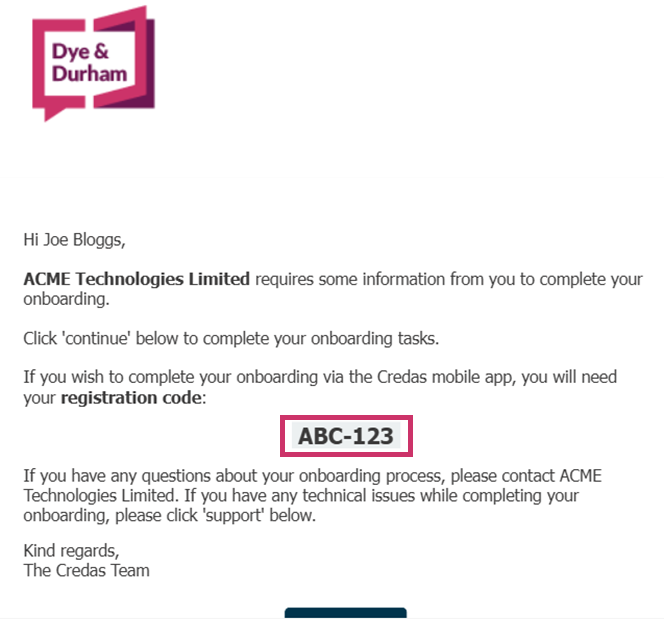
Your registration code can be found either on your email or SMS invitation, as can be seen on the below example email. You will need this unique registration code to complete any tasks via the Credas™ App. For more information on logging in, please click here.
Q - How do I reset my password
If you have forgotten your password, please follow the link here: My Connect
We will then send an access code to your email, which you will need to enter. After this, you will either have to receive an SMS code or enter your code from the authenticator app, depending on how you chose to enter your account.
Q - I do not have a smartphone, do you offer a web alternative?
We offer a selection of checks for Law Firms to choose from when issuing your onboarding tasks. These different tasks have different legislative requirements and therefore some can only be completed via the App.
Moreover we recommend completing the task via our Credas™ App as you will be able to scan your Passport via NFC, which often leads to a higher chance of successfully passing.
However, if you do not have a smartphone, and you have been issued a task that does not let you complete via the web, we recommend you speaking to the Law Firm who issued you the task, they will either send you a different Credas™ task that allows you to complete via the web, or they will provide an alternative way for you to complete your onboarding.
Q - How do I log back into my account?
You can log back into your account by entering your account credentials or unique registration code here - My Connect.
GENERAL FAQs
Q - Is my data safe?
Yes, Credas™ is designed with high security standards to protect user data and ensure a safe experience. We comply with strict industry standards and regulations, such as GDPR, to secure all personal information. We are also certified to the UK Government's Cyber Essentials Plus standards, and we hold the ISO 27001 certification, which is a globally recognised standard for information security management. No information is saved within our App or on your device. Our systems use enhanced encryption and secure data storage methods to safeguard sensitive data, and we regularly update and audit our systems.
Q - I have completed my check. What's next?
If you have completed all the required tasks requested by the Law Firm for your onboarding, these tasks will then be provided to the Law Firm to review. If they need anymore required information from you, they may send you another task from us to complete, or they will be in contact directly. For any questions regarding the status of your onboarding, please contact the Law Firm who issued you the tasks.
Q - Why have I been issued this check?
Each law firm's requirements for their onboarding tasks are different. If you are unsure why you have been asked to complete these checks, please reach out to the Law Firm who issued these to you.
Q - Have I been issued another check from you?
If you have been issued another check, this will have been of request from the Law Firm. They may need additional information or need you to resubmit information, such as your Identity Document. If you have any questions surrounding this, please reach out to the Law Firm who has requested these additional tasks.
Q - How do I log a Credas support ticket?
For Dye & Durham internal users raising a ticket or a Dye & Durham customer, I would advise they use this knowledge base and ticket link - Submit a ticket : Dye & Durham
IDENTITY DOCUMENTS FAQs
Q - I do not have an Identity Document from the list provided?
Depending on the nature of the transaction and your firm's compliance needs, you will be presented with different Identity Document options to verify your Identity. If you do not have an Identity Document from the list provided to you as part of your check, please contact the Law Firm who issued you your checks, and they will be able to provide another way to verify yourself.
Q - Why can't I upload a scan of my Identity Document?
The UK Government standards require you to capture your selfie and your Identity Document's in real-time. Therefore, we only accept capturing your Identity Document live as part of the check. However, if you have also been asked to provide proof of address or linking documents to your property, you can upload these documents from your files.
Q - Why have I been asked to re-take my Identity Document photograph?
If we were unable to verify your Identity Document, you may be asked to try again up to two more times. For more information on how to take a successful photograph of your Identity Document, please click here.
Q - Why do some parts of an ID report fail or with the status result "pending"?
The ID check could fail for multiple reasons, including image quality, obscured security features etc.
If you're able to access the Credas™ portal then you'll be able to view the detailed report which contains the reasons for the result, however if you're unable to access the portal then you can provide us with the applicants registration code and we'll advise further.
Clients can email our UK Search Support Team and we can query with Credas™ OR they can go directly to Credas™ using the following links:
For Customers (Law Firms):
For Clients:
PASSPORT NFC SCAN FAQs
Q - How do I know if I have an biometric/e-passport?
To check if your passport is a biometric/e-passport. For more information see here
Q - What is an NFC Scan?
NFC (Near Field Communication) scanning for passports is a technology that allows for the information stored in the passports chip by simply holding the passport close to a compatible device, such as a smartphone or NFC reader. For more information, please click here.
Q - I don't have a biometric/e-passport, how can I skip the NFC step?
You can skip the NFC step by cancelling it/failing it three times, this will then automatically move you onto the next step of your Identity Verification journey. For more information, please click here.
Q - How do I complete my NFC Scan?
If you indicated that you do have a biometric passport, after capturing a photograph of your Passport, you would be asked to complete the NFC Scan. For more information on how to complete this, please click here.
SOURCE OF FUNDS FAQs
Q - I do not have evidence of my source of funds
If you cannot provide evidence of your funds, we recommend contacting the Law Firm who requested this task, as they will be able to suggest alternative options.
Q - There is a not a funding option on the list that matches my funding source?
If none of the funding sources options match your funds, please either choose the closest matching funding source and connect the Law Firm who issued you the task so they are aware; or contact the Law Firm and let them know you are unable to finish the Source of Funds Questionnaire and they will be able to suggest alternative options.
Q - What is Open Banking?
Open Banking is a secure way for you to share certain banking information without having to print/post/email emails which can be frustrating and time consuming. Open Banking is a government backed technology that is used widely across the UK within our banks and businesses. However the choice is in your hands, and we offer the ability to add six months worth of bank statements instead of connecting to your bank via Open Banking.
Q - I don't have online banking, how do I evidence my funds?
If you do not have online banking, you can submit your bank statements to evidence your funds instead.
Q - Is Open Banking secure?
Open Banking is regulated, ensuring that providers utilising it must comply with strict data security rules. Providers must be authorised or registered with the Financial Conduct Authority (FCA) and adhere to the Payment Services Regulations 2017. These regulations impose rigorous requirements for data sharing, secure communication methods, and customer identification. Our Open Banking provider is Yapily.
Q - How many bank accounts can I connect too?
You can connect up to three different bank accounts to evidence your funds.